板级配置[必读]
目前支持的开发板有
| 开发板名称 | 备注 |
|---|---|
| ESP32-C3 系列 | ✅ |
| ESP32-S3 系列 | ✅ |
| linux 系列(各类开发派) | 开发中... |
1. 按需配置好 Pio 配置文件 platformio.ini
如果是 c3 自行删除 s3 配置,并且启用 c3 注释即可。
; PlatformIO Project Configuration File
;
;   Build options: build flags, source filter
;   Upload options: custom upload port, speed and extra flags
;   Library options: dependencies, extra library storages
;   Advanced options: extra scripting
;
; Please visit documentation for the other options and examples
; https://docs.platformio.org/page/projectconf.html

[platformio]
src_dir = .
lib_dir = ../libraries2

[env:esp32s3]
platform = espressif32 @~6.10.0
board = esp32-s3-devkitc-1
framework = arduino
monitor_speed = 115200
upload_speed = 921600       # 上传波特率(可根据需要调整)
; upload_speed = 115200       # 上传波特率(可根据需要调整)
board_build.arduino.partitions = app3M_fat9M_16MB.csv
board_build.arduino.memory_type = qio_opi
build_flags =
    -DARDUINO_ESP32_S3R8N16
    -DBOARD_HAS_PSRAM
    -DARDUINO_USB_MODE=1
    -DARDUINO_USB_CDC_ON_BOOT=1
    -DARDUINO_RUNNING_CORE=1
    -DARDUINO_EVENT_RUNNING_CORE=1
    -Iinclude
    -DLV_LVGL_H_INCLUDE_SIMPLE
    -Os ; 优化代码大小
    -ffunction-sections
    -fdata-sections
    -Wl,--gc-sections ; 移除未使用的代码段

board_upload.flash_size = 16MB
monitor_filters = esp32_exception_decoder
build_type = debug


; ; C3配置
; [env:esp32c3]
; platform = espressif32 @~6.10.0
; board = esp32-c3-devkitm-1
; framework = arduino
; monitor_speed = 115200
; upload_speed = 921600
; build_flags =
;     -DARDUINO_ESP32C3
;     -DBOARD_HAS_PSRAM=0
;     -DARDUINO_USB_MODE=1
;     -DARDUINO_USB_CDC_ON_BOOT=1
;     -DARDUINO_RUNNING_CORE=0
;     -DARDUINO_EVENT_RUNNING_CORE=0
;     ; -Wl,-Map,firmware.map ; # 生成链接映射文件(firmware.map)以便调试和分析代码大小
;     -Os ; # 启用链接时间优化(LTO)以减小代码体积
;     -ffunction-sections
;     -fdata-sections
;     -Wl,--gc-sections


; board_build.flash_mode = dio
; board_upload.flash_size = 16MB
; board_build.arduino.partitions = app3M_fat9M_16MB.csv
; monitor_filters = esp32_exception_decoder
; build_type = debug
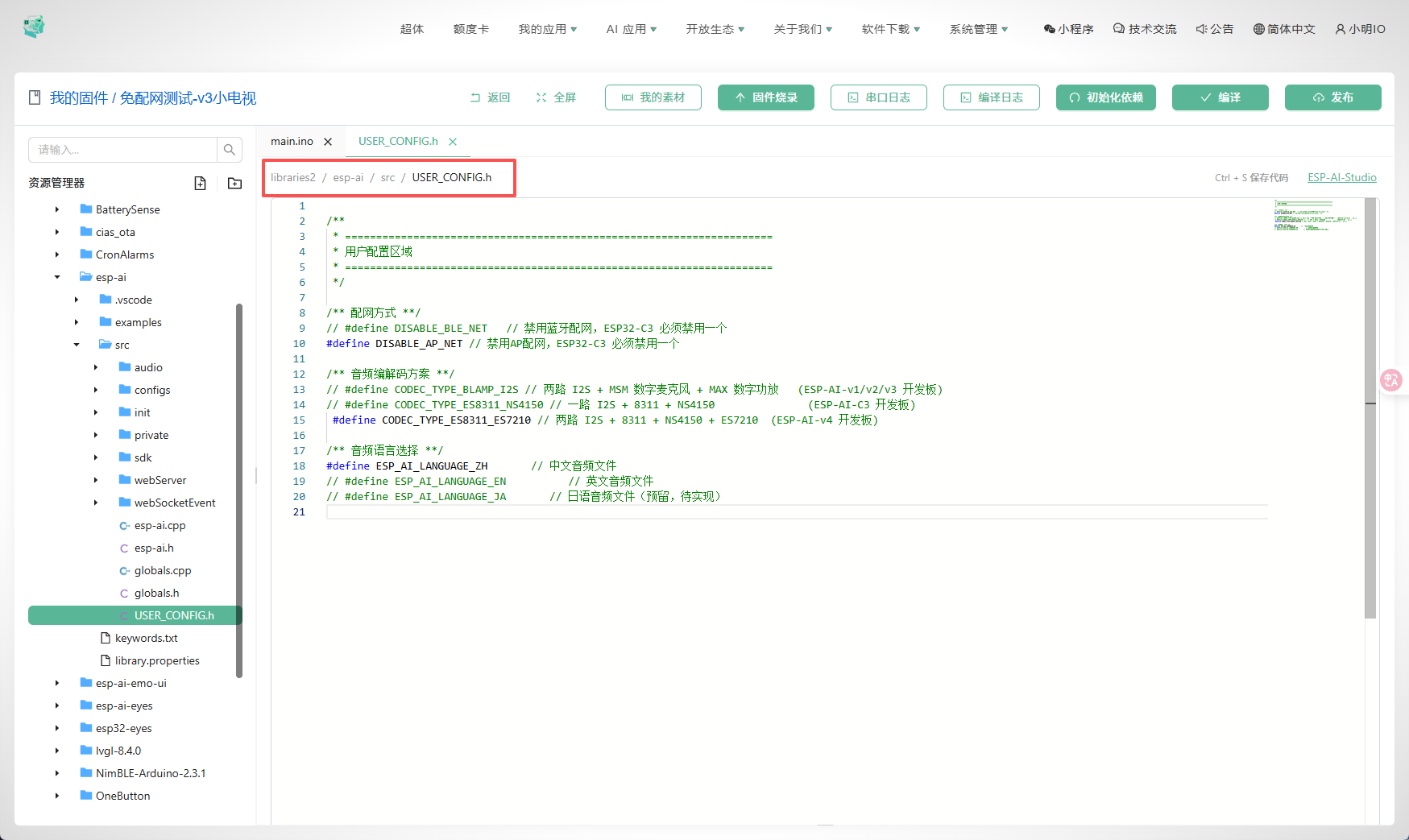
2. 按需配置 ESP-AI 库
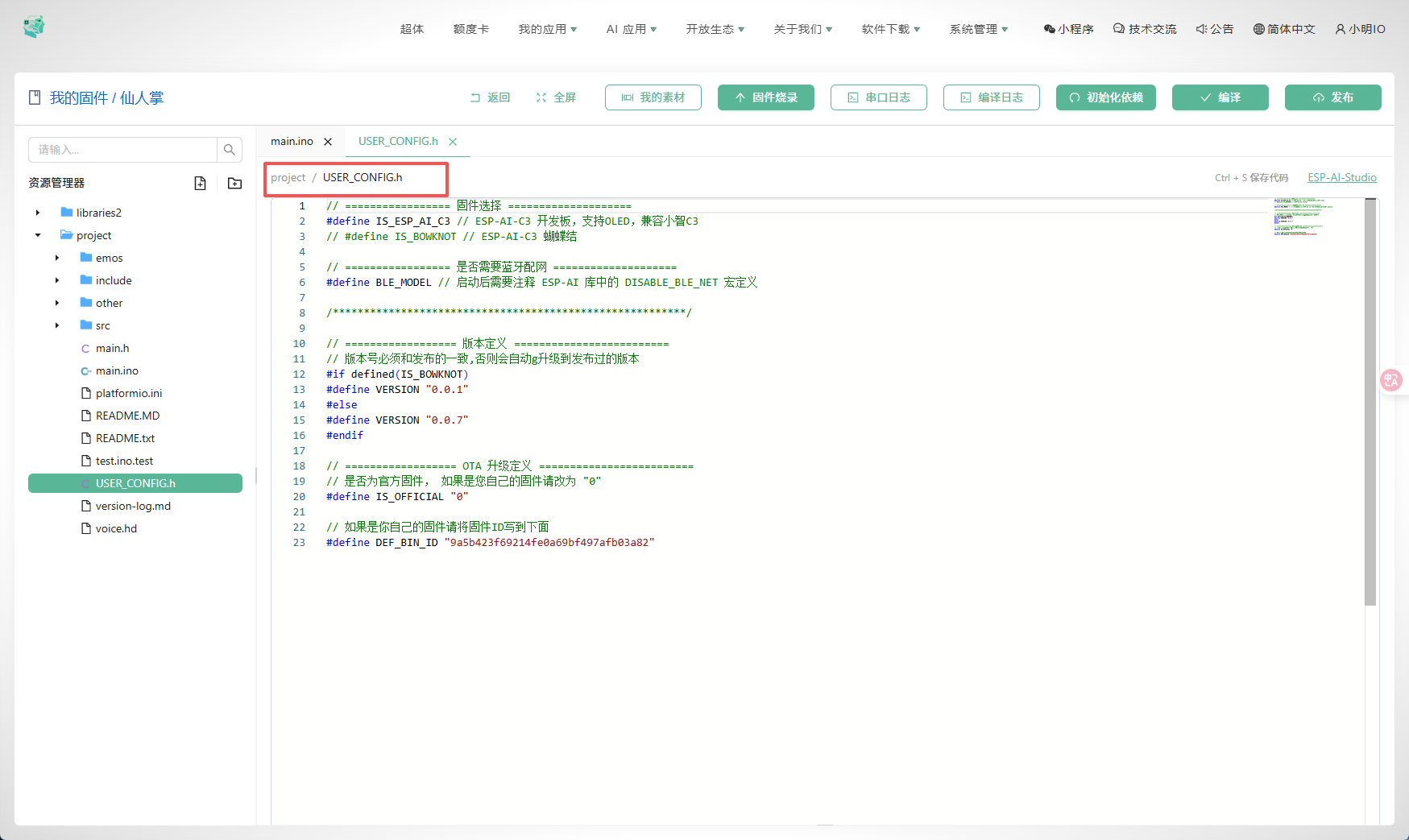
3. 如果你用的官方开源固件,还需要修改下面配置
自行按需配置即可。
End. 开启你的 Diy 之旅吧~